Shaderverse
Looks and source graphs
A Shaderverse look should be selected as a look json. That json should record the Shaderverse graph that authored it and the package files Roji needs.
USD input
Load a shot or asset for lookdev
- Create an Assembler node and add the
.usd,.usda, or.usdcfile you want to shade. - Use the loaded stage as context for Material Assign targets, CEL expressions, collections, previews, and renders.
- Connect Assembler into Material Assign or a Merge branch before Shaderverse Out if the package needs scene-aware assignments.
- Save the file as a
.svgraph so the source look remains editable after publishing.
Workflow
Build, assign, publish, and read back
- Add Material nodes for the looks you need. Name them for the asset, character, prop, or surface they represent.
- Edit shader parameters, texture paths, MaterialX import/export, preview settings, and any animated values inside the Material node.
- Add Material Assign and target geometry with CEL, collections, or explicit paths from the loaded USD stage.
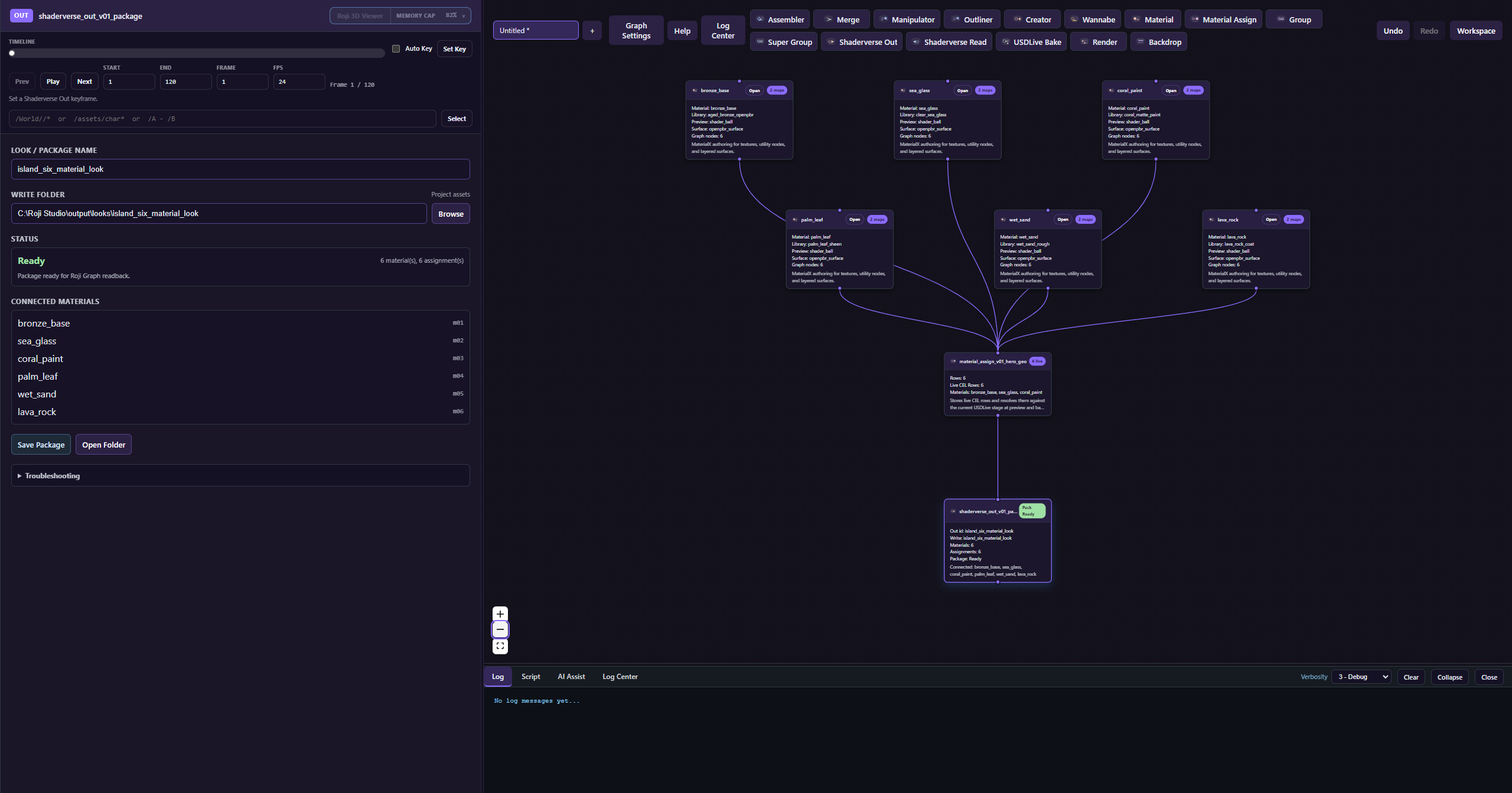
- Connect Material and Material Assign into Shaderverse Out, then Save Package.
- Use Shaderverse Read in Roji Graph to apply the package to a shot before Render or USDLive Bake.
Connections
Connect lookdev nodes clearly
- Drag from an output handle to the next node's input handle. Downstream nodes only see connected upstream data.
- Keep a readable main line: Assembler, Material or Material Assign, Shaderverse Out, optional Render or Bake.
- Use Merge when several materials, assignment branches, or scene branches must feed one publish or render node.
- Use Group, Super Group, and Backdrop to organize reusable material systems without changing the authored look.
Look package
Select the look json
- Shaderverse Out: writes a look json and shader package into the project assets or looks folder.
- Shaderverse Read: connects into the Roji graph so the look can flow downstream.
- Source graph: the look json should store the Shaderverse graph path that created it.
- Package files: shader files, the authored USD look, resolved bindings, source graph, and MaterialX sidecar should stay beside the look package.
MaterialX interchange
Shaderverse writes MaterialX, Roji renders USD
Shaderverse is the editable source of truth. MaterialX is the interchange sidecar. Roji Render consumes the generated USD layer, where Shaderverse materials are authored as MaterialX/OpenPBR-style UsdShade networks.
- Author: edit Material nodes in Shaderverse. The material graph keeps Roji layout, expressions, preview settings, and renderer-only controls.
- Import/export: use Import .mtlx and Export .mtlx inside each Material node's Material Graph workspace for external look exchange.
- Package: Save Package writes
shaderverse_graph.sv,looks.authored.usda, optionallooks.resolved.usda, andlooks.mtlx. - Render: Roji Graph composes the USD layers from Shaderverse Read. Roji Render does not render the
.mtlxfile directly; it renders the generated USD material network.
Open
Open the original Shaderverse graph
Open Shaderverse should launch Shaderverse first, then open the saved source graph. It should not create a new empty graph when a look already knows its source graph.
Real screenshot needed
Shaderverse Read node in Roji Graph with a real selected look json and the Open Shaderverse control.
Copy paste
Keep readable node names
Copy paste between Roji Graph and Shaderverse should preserve names like Assembler and Manipulator, not only ids and versions.
Reference
Every Shaderverse node
| Node | Use it for | Typical connection |
|---|---|---|
| Assembler | Load USD context for lookdev and assignment targets. | First node when the look depends on a shot or asset stage. |
| Material | Author shader graphs, material parameters, textures, procedural controls, and MaterialX exchange. | Feed Material Assign or Shaderverse Out. |
| Material Assign | Assign materials using live CEL rules, collections, or explicit targets. | After Assembler and Material; before Shaderverse Out, Render, or Bake. |
| Shaderverse Out | Publish the package json, source .sv, authored USD look, optional resolved USD, and MaterialX sidecar. | End of the publish branch. |
| Shaderverse Read | Read a saved look package for round-trip testing or downstream use. | Before Render or Bake when testing a package inside Shaderverse. |
| Manipulator | Scene edits needed for lookdev context, visibility, attributes, lights, collections, and CEL scopes. | After Assembler and before assignment, render, or publish checks. |
| Outliner | Inspect the composed USD stage, prim paths, geometry, cameras, and lights. | Attach wherever target paths need to be checked. |
| Creator | Create lookdev helpers such as lights, cameras, preview geometry, volumes, and instance systems. | After Assembler or on a side branch merged into preview/render. |
| Wannabe | Experimental candidate edits and quick ideas. | Use in controlled branches; replace for production-critical looks. |
| TypeScript | Scripted automation, validation, and repeated technical lookdev tasks. | Anywhere scripted graph logic is needed. |
| Merge | Combine several look, scene, or utility branches. | Before Shaderverse Out, Render, Bake, or group output. |
| Group | Package small reusable material or assignment networks. | Use as a clean subgraph with clear input and output. |
| Super Group | Package larger reusable lookdev systems. | Use for department-level or sequence-level shader systems. |
| Render | Preview and render lookdev outputs with camera, AOV, quality, lightgroup, and output controls. | After the look and assignment branch. |
| USDLive Bake | Write the live result to plain USD for external handoff. | Last node when plain USD is required. |
| Backdrop | Canvas labels and organization. | Layout only; does not affect material or scene data. |
| Group Input / Group Output | Internal group boundaries. | Created inside grouped workflows. |